

Do you think it’s time for a workplace revolution?
As times change, so must our approach to work. Do you think it’s time for a workplace revolution?

Remote work has become a staple in modern life, offering flexibility—but demanding new approaches to security. Home offices cut out some physical risks, but introduce unique digital threats, including cyber threats such as phishing, malware, and unauthorized access.

Remote work has become a staple in modern life, offering flexibility—but demanding new approaches to security. Home offices cut out some physical risks, but introduce unique digital threats, including cyber threats such as phishing, malware, and unauthorized access. Whether you’re at a kitchen table or a dedicated home office, the steps you take matter more than your location. Remote work can also take place in co working spaces and coffee shops, and these environments require special attention to security. Here’s how you can stay safe and keep your company’s data secure by creating a secure environment wherever you work.
(Summary in voice file at the end)
Remote work, often referred to as remote working or telecommuting, has rapidly transformed the traditional office environment. Thanks to advances in technology and a growing demand for flexible working arrangements, more organizations are enabling employees to work remotely from virtually anywhere with an internet connection. This shift brings significant advantages: remote workers often enjoy greater productivity, improved work-life balance, and the elimination of daily commutes. However, working outside the office also introduces new security risks. Protecting company data and sensitive information becomes more complex when employees access business tools and files from various locations and personal devices. To address these challenges, organizations must implement robust security protocols that safeguard sensitive company data, prevent unauthorized access, and ensure business continuity. By prioritizing data security and adopting best practices, companies can empower their remote workforce to work efficiently and securely, no matter where they are.
Cybercriminals are always looking for ways to exploit remote work setups, putting confidential information and business information at risk, from hacking into home Wi-Fi to tricking people with increasingly sophisticated phishing scams. The good news is you can dramatically reduce your risk by combining smart technology choices, good habits, and a little bit of vigilance, along with robust security protocols that safeguard sensitive company data to prevent unauthorised access.
Secure your WiFi network: Change your router’s default password to something else and use the strongest encryption setting available, preferably WPA3. if possible, set up a separate Wi-Fi network just for work devices—don’t let everything share the same lane.
Strong authentication:Always use strong, unique passwords—strong passwords are essential for protecting your accounts and preventing unauthorised access. Enable Multi-Factor Authentication (MFA) for all work accounts, as MFA provides an extra layer of protection beyond just passwords. Even more robust: consider modern options like hardware security keys or biometrics.
Keep software updated:Hackers target out-of-date apps and devices. Make a habit of installing updates as soon as they’re available for your operating system, browser, antivirus, and any other work apps.
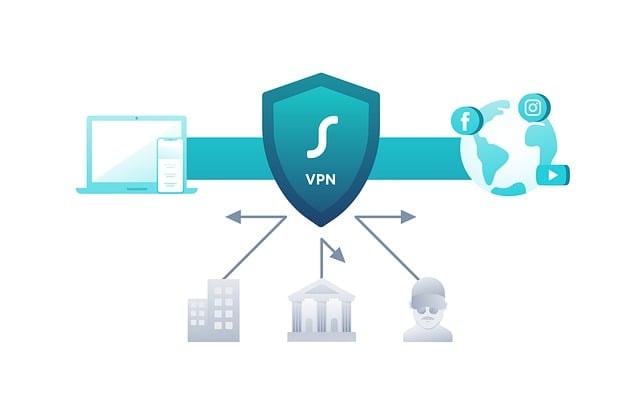
Use a VPN:A Virtual Private Network (VPN) encrypts your traffic, shielding sensitive company information from prying eyes—especially vital when working outside the office. Using a VPN also helps prevent unauthorised access to company resources.
Stay alert to threats:Phishing attacks are getting smarter. If you get an unexpected email, link, or attachment—even if it seems to come from someone you know—verify before clicking.
Keep your work devices safe:Don’t let family members or friends use your work laptop, and store it in a secure place when you’re not around.
Lock your screen:Step away for a coffee break? Lock or shut down your computer—an unlocked screen is an open invitation to trouble.
Protect from prying eyes:Avoid having your screen visible to others, whether from a window or as a background in video calls. Think about using a privacy screen, especially when handling confidential info.
Control sensitive information:Printed papers or loud phone conversations can be overheard. Make sure only those who need to know, know.
Stick to approved technology:Use only devices and software your company has cleared for work tasks—they’ve been vetted for security risks. If you must use your own devices, follow company guidelines for secure access, such as VDI or DLP, to protect corporate and customer data.
Encrypt everything:Enable drive encryption (like BitLocker) on work devices to keep your data safe, even if a device is lost or stolen.
Back up your work:Save your files regularly in secure, company-approved locations. This is your safety net in case of hardware failure or cyberattack.
Keep work and personal separate:Mixing business and personal data on the same device can spell trouble. Log in with separate accounts, and avoid storing company files on personal cloud drives or USB sticks to maintain a secure work environment.
Security is everyone’s responsibility. Whether you’re working remotely or in the office, it’s crucial to maintain the same standard of security to ensure consistent protection across all environments.
Stay educated: Employees who know the ropes are the strongest defense against breaches. Take part in security awareness training, practice spotting fake emails, and report anything suspicious—no matter how small. Proactively addressing security issues should be part of your daily remote work routine.
Good security blends solid technology (tools like VPNs, encryption, authentication) with aware, proactive people. By building these habits into your daily remote work routine, you help protect not only yourself but the entire organization.
More security tips or help with setting up secure remote access
Advanced Security Guide: Setting Up Secure Remote Access
You’ve got the basics of remote work security down—now let’s dive deeper into setting up secure remote access and implementing advanced security measures that protect your organization from evolving threats.
Secure remote access allows employees to connect to company resources from anywhere while maintaining the same level of protection as if they were in the office. The key is creating encrypted, authenticated connections that verify both user identity and device security before granting access.
Why it matters: Traditional security relied on a trusted office network perimeter. With remote work, businesses can reduce costs associated with maintaining physical office space, and the nature of office working shifts toward more flexible and hybrid arrangements. Remote work eliminates that boundary, requiring a new approach that treats every connection as potentially untrusted until proven otherwise.
A Virtual Private Network (VPN) creates an encrypted tunnel between remote devices and your company network, protecting data from interception. Maintaining a secure connection is essential for all remote work activities to safeguard sensitive information and communications from external threats.
Planning Your VPN Deployment
Choose your VPN solution:
Prepare your network infrastructure:
Deploying VPN Servers
Use strong encryption protocols:
Enable Perfect Forward Secrecy to protect against future key compromise, ensuring that even if encryption keys are stolen later, past communications remain secure.
Rolling Out to Employees
Install VPN client software on all employee devices using:
Configure DNS settings to prevent DNS leaks and ensure employees can reach internal resources. Implement split-tunneling to decide which traffic routes through the VPN versus direct internet access.
Set up load balancing across multiple VPN servers to support growth and configure automatic failover for maintenance windows.
Zero Trust operates on the principle of “never trust, always verify”—a security model that assumes no user or device is trustworthy by default, regardless of location. As digital transformation accelerates, organizations must urgently adopt safe remote work practices to maintain business continuity and security in the face of new challenges like remote and hybrid workplaces.
Core Zero Trust Principles
Identity-centric security: Base access decisions on user identity, device health, and behavioral patterns rather than network location.
Least-privilege access: Grant users access only to specific applications they need, not entire network segments.
Continuous verification: Constantly assess trust levels throughout sessions, not just at login. Monitor user behavior, device posture, and connection context in real-time.
Micro-segmentation: Divide your network into isolated zones that limit lateral movement if attackers breach one area.
Implementing Zero Trust for Remote Work
Step 1: Strengthen identity controls
Step 2: Define critical assets
Step 3: Enforce conditional access policies
Step 4: Enable continuous monitoring
RDP is a frequent attack target. If your organization uses Remote Desktop, these measures are essential.
Critical RDP Security Measures
Never expose RDP directly to the internet. Always require a VPN connection first, then allow RDP access only from within your network.
Enable Network Level Authentication (NLA) to require authentication before establishing a session, protecting against man-in-the-middle attacks.
Implement an RDP Gateway for enterprise environments. This provides a secure HTTPS (port 443) connection that manages all remote desktop requests, allowing you to restrict RDP ports to only accept connections from the gateway
Restrict access with firewalls:
Use Multi-Factor Authentication for RDP sessions to prevent unauthorized access even if passwords are compromised.
Restrict local administrators from using RDP and implement Local Administrator Password Solution (LAPS) to prevent attackers from accessing multiple machines with a single compromised account.

Endpoints (laptops, phones, tablets) become the new security perimeter when employees work remotely.
Essential Endpoint Security Features
Endpoint Detection and Response (EDR): Modern EDR solutions use behavioral analysis, machine learning, and threat intelligence to detect both known and unknown threats based on suspicious activities.
Full-disk encryption: Enable BitLocker or equivalent to protect data if devices are lost or stolen. Even with physical access, encrypted drives remain unreadable without proper authentication.
Automated patching: Keep operating systems and applications updated automatically. Many attacks exploit known vulnerabilities in outdated software.
Application control: Prevent unauthorized software from running, addressing shadow IT risks where employees install unapproved apps.
Remote wipe capabilities: If a device is lost or stolen, IT should be able to remotely erase company data to prevent breaches.
DLP tools monitor, detect, and block sensitive data from leaving your organization through unauthorized channels.
Implementing DLP for Remote Work
Classify and inventory sensitive data:
Enforce encryption for data at rest and in transit:
Monitor data in motion:
Implement context-aware policies:
Separate work and personal data:
Regular audits and employee training:
Strong authentication forms the foundation of secure remote access.
Multi-Factor Authentication (MFA) Deployment
Deploy MFA across all access points:
Choose phishing-resistant MFA methods:
Implement adaptive authentication:
Password Management
Enforce strong password policies:
Monitor for compromised credentials:
Protecting the connection itself is just as important as securing endpoints.
Secure Wi-Fi Practices
For home networks:
Securing your home environment is essential for effective home working, as more employees rely on their home networks for business activities.
Avoid public Wi-Fi:
Network Segmentation
Divide networks into isolated zones:
For remote work to be successful, seamless communication and collaboration are essential. Remote teams rely on a variety of digital tools to stay connected and maintain productivity. Instant messaging platforms like Slack and Microsoft Teams allow for quick, real-time conversations, while video conferencing tools make it easy to hold virtual meetings and maintain face-to-face interactions. Project management solutions such as Trello help teams organize tasks, track progress, and collaborate on projects from anywhere. By leveraging these communication and collaboration tools, remote workers can overcome the barriers of distance, ensuring that everyone stays informed, engaged, and able to contribute effectively to work-related tasks.
Maintaining business continuity and compliance is a top priority for organizations embracing remote work. With sensitive data being accessed and shared outside the traditional office environment, companies must ensure that their remote working practices meet all regulatory requirements and industry standards. This means implementing robust security protocols, such as enabling multi-factor authentication and encrypting data, to protect against data breaches and unauthorized access. By prioritizing the security of sensitive data and adhering to compliance guidelines, organizations can minimize the risk of costly fines, reputational damage, and operational disruptions. A strong focus on business continuity ensures that, even in the face of unexpected events, remote employees can continue to work securely and keep the business running smoothly.
Clear company policies and procedures are the backbone of secure and effective remote work. Establishing comprehensive guidelines for data security, communication, and collaboration helps remote workers understand their responsibilities and the standards they must uphold. These policies should outline best practices for handling sensitive information, using approved business tools, and maintaining secure connections. Regularly reviewing and updating company policies ensures they remain relevant as technology evolves and new security risks emerge. By fostering a culture of security and accountability, organizations can empower their remote workforce to protect company data and maintain compliance, no matter where they work.
Security isn’t a one-time setup—it requires ongoing vigilance.
Continuous Monitoring
Implement comprehensive logging:
Use Security Information and Event Management (SIEM):
Regular Security Reviews
Conduct quarterly audits:
Perform penetration testing:
Rolling out secure remote access can feel overwhelming. Here’s how to approach it systematically:
Phase 1: Foundation (Weeks 1-4)
Phase 2: Enhancement (Weeks 5-12)
Phase 3: Optimization (Month 4+)
Setting up secure remote access requires specialized expertise. Consider engaging:
Managed Security Service Providers (MSSPs) who can design, deploy, and monitor your security infrastructure.
Your IT support team should be your first point of contact for troubleshooting access issues, requesting new access permissions, or reporting security concerns.
Internal security training programs to ensure all employees understand their role in maintaining security.
To further empower remote workers and maintain productivity, seek out additional resources that provide supplementary tools and support tailored to your team’s needs.
Secure remote access isn’t about implementing every security tool available—it’s about creating a layered defense that balances protection with usability:
The most effective security programs combine technical controls with security-aware users. By implementing these practices, you create a resilient remote access framework that protects your organization while supporting flexible work arrangements. Remote workers can maintain security without sacrificing their personal life, ensuring a healthy balance between professional responsibilities and private time.

As times change, so must our approach to work. Do you think it’s time for a workplace revolution?

Protect your business from cyberattacks with our Cyber Essentials checklist. Learn about the five key controls and how GSDIT can help you achieve certification.

This comprehensive guide explores the multifaceted nature of phishing attacks and provides actionable strategies for protection.


Copyright © 2026. GSDIT. All rights reserved.