

Reliable IT Support for Your Cambridge Business
Cambridge, celebrated for its historic significance and dynamic technology sector, hosts numerous enterprises that depend on robust IT solutions to thrive and surpass competitors.

AI usage among small businesses is rapidly increasing, as more companies leverage artificial intelligence to automate tasks, enhance content creation, and gain a competitive edge in their operations.
This guide is for small business owners, IT managers, and consultants looking to leverage AI for real productivity gains. We cover 14 proven AI platforms across automation, res


AI usage among small businesses is rapidly increasing, as more companies leverage artificial intelligence to automate tasks, enhance content creation, and gain a competitive edge in their operations.
This guide is for small business owners, IT managers, and consultants looking to leverage AI for real productivity gains. We cover 14 proven AI platforms across automation, research, creative, and data analysis use cases. Choosing the right AI tools can help small businesses save time, reduce costs, and stay competitive in a rapidly evolving market.
Most AI tools promise you’ll “10x your productivity” and then deliver… a fancy chatbot that can’t remember context, can’t cite sources reliably, and can’t plug into your daily workflow. Over the past 12 months I’ve tested 14 platforms properly—real client work, real deadlines, real constraints. Here are the ones that consistently saved time (and where the trade-offs actually are).
Tool Name | Primary Use Case | One-Line Benefit for Small Businesses |
|---|---|---|
Abacus.ai | Model Aggregator/AI Workspace | Access 31+ AI models in one place for flexible productivity |
OpenRouter.ai | Model Aggregator/Edge-Case Capability | Tap into 590+ models for specialized or experimental needs |
Google Gemini | Search & Research Assistant | Fast, accurate answers integrated with Google Workspace |
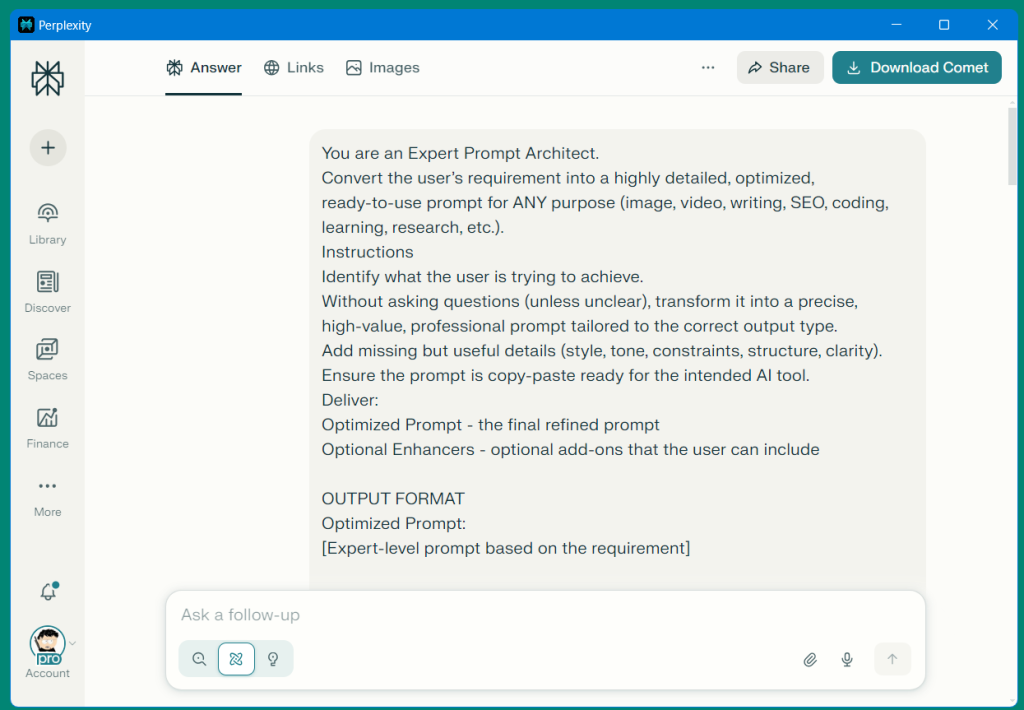
Perplexity | Research with Source Citation | Get traceable, up-to-date answers with cited sources |
Google Labs | Creative Prototyping/Experiments | Early access to new AI features for creative workflows |
Lummi | Free AI Stock Photos | Generate business-ready visuals at no cost |
Freepik | Full-Stack Media Generation | Create images, videos, and music for marketing campaigns |
Canva AI | Design & Content Creation | Quickly produce branded assets without a designer |
MonkeyLearn | No-Code Text Analysis | Analyze surveys and feedback without coding |
Tableau Pulse | AI-Powered Dashboards | Visualize and detect trends in business data instantly |
Notion AI | Brainstorming & Organization | Organize ideas and automate notes for better productivity |
NotebookLM | Document Analysis & Synthesis | Summarize and extract insights from your own documents |
Wispr Flow | Voice-to-Text with Context | Capture and structure meeting notes and debriefs on the go |
DeepL | High-Quality Translation | Translate business content with nuance and accuracy |
n8n | No-Code Automation Platform | Automate workflows and save hours on repetitive tasks |
Manus & Genspark | Emerging AI Agents | Experiment with autonomous task execution |
Comet | YouTube Video Summaries | Get quick, actionable video insights without watching full videos |
If you’re an IT manager, consultant, or small business owner, the hidden cost of AI isn’t the monthly fee—it’s the friction: logins, separate histories, inconsistent outputs, and constant “which tool did I use for that?” moments.
A model aggregator is a platform that allows users to access and switch between multiple AI models from a single interface.
Model aggregators fix that by letting you choose the best model for the job without multiplying subscriptions. These platforms offer advanced AI capabilities, such as seamless integration with other tools and customization options, and often include integrated AI support to help users maximize productivity and streamline their workflows.
Why it matters:
In my testing, having 31 models (including GPT, Claude, Gemini-class options) behind one workspace at $10/user/month (Basic) changed the economics. It’s the difference between “AI is a nice-to-have” and “AI is just another standard tool on the stack.” Abacus.ai does not offer a free version, but its paid plans provide access to advanced features, multiple model integrations, and enhanced support, making it a strong value for businesses ready to invest in AI.
A specific use case (consultant-friendly):
I used Abacus.ai as a “single cockpit” for client-facing work where speed and tone consistency mattered:
What this replaced:
In practical terms, it can easily save $60–$120/month if you were previously paying for multiple premium tools “just in case.”
Limitations / honest trade-off:

Why it matters:
OpenRouter’s advantage is sheer breadth—~591 models available (at the time of writing). That matters for power users who want:
OpenRouter.ai is primarily aimed at power users and businesses seeking extensive model variety and customization.
Cost-per-token & flexibility trade-offs:
OpenRouter is often a usage-based story: you pay based on tokens and the model you choose. That’s great if you’re disciplined and technical enough to track spend—and if your workload varies. It’s less great if you want predictable monthly budgeting or if your team tends to “just try things” without monitoring cost.
When I’d pick it over a flat plan:
Limitations:
Once you have the right models in place, the next challenge is finding and organizing information efficiently—enter AI-powered search and research tools.
Search is where most businesses waste hours: scattered tabs, questionable sources, and “I know I read it somewhere” follow-ups.
While traditional search engines can be time-consuming and require sifting through countless results, AI-powered research tools streamline the process and deliver more relevant insights. Strong research tools don’t just answer—they reduce rework.
Why it’s #1 (in practical terms):
In day-to-day testing, Gemini has been the best combination of:
If your company runs on Gmail, Docs, Drive, Calendar, and Meet, you don’t want an AI tool that feels bolted-on. You want one that fits your existing information architecture.
Concrete use case:
When I’m preparing for a client QBR (Quarterly Business Review), I’ll use Gemini to:
Limitations / trade-off:
If your workflow depends heavily on deep citations and “show me exactly where that came from,” a research-first tool can beat it on source transparency.
Perplexity earns its keep when you need traceable answers and fresh web context.
What it’s best at:
Compared to traditional Google search:
Google search is still unmatched for breadth and “I want to browse,” but Perplexity compresses the workflow: it answers, cites, and lets you iterate without opening 12 tabs.
Gemini vs. Perplexity: Quick Comparison
Feature | Gemini (Google) | Perplexity |
|---|---|---|
Source Citation | Basic, less transparent | Strong, with direct links |
Workflow Integration | Deep with Google Workspace | Standalone, browser-based |
Speed-to-Output | Fast, especially in Google ecosystem | Fast, but less integrated |
Honest trade-off vs Gemini:
With research streamlined, the next step is to accelerate creative output—especially for marketing and content needs.
A lot of “AI creativity” is gimmicky. Marketing AI is transforming content creation and campaign execution for small businesses by generating written content, images, videos, and podcasts tailored to a brand’s voice.
The platforms below are the ones that reliably reduced time-to-publish for small teams—without requiring a full-time designer.
Google Labs is less “one tool” and more a stream of experiments. For early adopters, this matters because the winners often become first-class features later. Early access to new tools through Google Labs allows businesses to stay ahead of the curve in creative workflows.
Concrete use case:
I use Labs-style tools to prototype workflows before rolling them out to a team—especially anything involving summarisation, content generation, or multimodal input.
Limitation:
Experimental means inconsistent. Don’t build mission-critical processes on features that may change or vanish.
If you publish blogs, landing pages, or LinkedIn posts, visuals are a bottleneck. Lummi has been the most usable free AI tools option I’ve tested for stock-style imagery that fits business content.
Concrete use case:
Limitation:
Like all stock, you’ll still want brand consistency. Use a defined style (lighting, colour palette) and reuse patterns.
Freepik is the “one subscription, many media types” play: image generation, design assets, and increasingly video/music tooling.
Concrete use case:
Licensing note (important):
Always check licensing terms for commercial usage and client deliverables. This is where teams get burned—don’t assume “AI-generated” means “risk-free.”
Limitation:
Quality can vary by style. It’s strong for marketing production, less reliable for ultra-specific brand detail.
Canva remains the quickest path from “idea” to “asset published.” The AI features (magic design / copy / background edits) remove friction for SMEs and help small businesses create content efficiently for various platforms.
Concrete use case:
A client needed a same-day event promo pack:
Canva AI reduced this from a half-day of fiddling to something closer to 60–90 minutes, including revisions.
Limitation:
You can still end up with “Canva-looking” output unless you lock down brand fonts, colours, and templates. It’s also important to ensure your brand voice stays consistent when using Canva AI to create content for marketing and communications.
With creative assets in hand, the next frontier is making sense of your business data—fast.
For small business owners, making sense of raw data can be the difference between guessing and growing. AI powered tools are transforming how business owners approach data analysis—enabling users to spot trends, uncover insights, and make smarter decisions in just a few clicks.
Instead of spending hours wrangling spreadsheets or waiting on reports, you can now leverage AI models to turn customer data, sales figures, and feedback into actionable strategies.
When it comes to data analysis, the best ai tools are those that combine power with accessibility. Platforms like MonkeyLearn, Tableau Pulse, and Notion AI are leading the way, offering small businesses advanced capabilities without the need for technical expertise. Whether you’re looking to analyze customer feedback, visualize sales trends, or generate insights from unstructured data, these ai powered tools make it possible to do more with less.
AI powered tools take the heavy lifting out of data analysis. By automating repetitive tasks—like sorting survey responses or flagging unusual patterns—AI models can process massive datasets in seconds, not days.
Benefits:
Over time, these ai systems learn from your data, delivering more personalised service and increasingly accurate recommendations that help you stay ahead of the competition.
MonkeyLearn is a standout for small businesses that want to tap into the voice of the customer without hiring a data scientist. With its no-code, drag and drop editor (no-code means you can build workflows or models without writing any programming code), you can quickly build custom text analysis models to sift through survey results, online reviews, or support tickets.
The platform’s ai powered algorithms highlight key themes and sentiment, so you can focus your marketing efforts where they’ll have the most impact. No technical expertise required—just connect your data and start generating insights.
Tableau Pulse brings ai powered data analysis to your fingertips with interactive dashboards and smart trend detection. Designed for business owners who need to see the big picture at a glance, Tableau Pulse uses machine learning to surface important changes and predictive performance scores.
You can visualize everything from sales pipelines to customer satisfaction in real time, making it easier to spot opportunities and address issues before they escalate. The user friendly interface means you don’t need to be a data analyst to get value—just plug in your data and let the AI do the rest.
Notion AI helps small businesses brainstorm ideas, organize findings, and automate note-taking. It’s especially useful for teams that need to keep projects, research, and documentation in one place, with AI-powered suggestions and summaries to speed up workflows.
By adopting these ai powered tools, small businesses can save time, reduce manual effort, and make better decisions based on real data.
Whether you’re using Notion AI to brainstorm ideas and organize your findings, or relying on MonkeyLearn and Tableau Pulse for deeper data analysis, the right AI solution can turn information overload into a competitive advantage.
For business owners looking to grow, streamline operations, and deliver more personalised service, investing in the best ai tools for data analysis is a smart move.
With your data working for you, the next step is to reclaim hours lost to document handling and voice notes.
This category is pure ROI: documents and voice notes are where time disappears quietly. Document and voice intelligence tools can streamline business processes by automating information extraction and synthesis, making workflows more efficient and reducing manual effort.
NotebookLM is the tool I recommend when someone says: “We have the information—just not the time to make sense of it.”
What it transforms:
Concrete use case:
I’ve used it to ingest client documentation (runbooks, SOPs, vendor quotes) and produce:
Limitation:
It’s only as good as the sources you give it. Garbage in, garbage out—just faster. Also, be cautious not to upload sensitive data unless you are sure the tool provides adequate safeguards and role-based permissions to protect your information.
Standard dictation is fine for short notes. Wispr Flow-style tools shine when you’re moving fast and need context-aware capture.
Concrete use case (IT pro reality):
After a site visit, I’ll speak a debrief while walking to the car:
Wispr Flow can also function as an ai meeting assistant by capturing and summarizing meeting discussions, making it easier to generate actionable outputs from both virtual and in-person conversations.
Then I convert it into a ticket list + email summary. This routinely saves 30–45 minutes per engagement because the hardest part—starting—gets eliminated.
Limitation:
You still need to proofread names, model numbers, and technical terms.
DeepL is consistently better than generic translation when tone and nuance matter—especially for European languages and business writing.
Concrete use case:
Limitation:
For highly regulated or legal content, you still want a human review.
With document and voice workflows optimized, the next leap is automating entire business processes.
If you want measurable time savings, look here first. Automation is where AI stops being “content” and becomes “process.” AI-powered automation tools can handle routine tasks such as data entry, freeing up time for higher-value work.
n8n is the strongest all-rounder I’ve used for no-code automation (no-code means you can build workflows or models without writing any programming code) with enough depth to satisfy IT teams.
Workflow use cases for IT + business ops:
Case study: How I used Abacus.ai + n8n to automate client onboarding (Saved 6 hours/week)
Before:
After (automated flow):
Measured result:
Limitation:
Automation needs ownership. If nobody maintains workflows, they rot.
Agent platforms are heading toward “give it a goal, it executes.” The opportunity is huge: autonomous research, drafting, follow-up, scheduling, even light ops.
Where they fit today:
Limitation:
Reliability and governance are still the big blockers. Treat agents like interns: useful, fast, occasionally wrong, always needs oversight.
Comet-type tools are deceptively valuable. Video is information-dense but time-expensive.
Concrete use case:
Some video summarization tools now include ai chat features, allowing interactive Q&A about video content.
Limitation:
Summaries can miss nuance. For high-stakes decisions, still watch key segments.
A one-page cheat sheet you can keep on your desktop: categories, best use cases, “use this when…” prompts, the starter/advanced stacks below, and a list of recommended free tools for small businesses.
Calculate time saved and costs reduced across your top 5 AI tools. Download now for free.
Inputs: hourly rate, minutes saved per task, frequency, tool cost → outputs ROI, payback period, and annual savings.
The biggest lesson: the Best AI Tools for Small Business aren’t the flashiest—they’re the ones that fit your workflow and reduce repeat work. Generative AI and AI-generated content have transformed how small businesses create marketing materials, automate communication, and streamline operations.
However, with the rise of undetectable AI tools that can rewrite AI-generated content to bypass detection, ensuring content authenticity and originality is more important than ever. AI wins when it shortens the path from “input” to “decision” to “done,” especially in search/research, document handling, and automation.
Which AI tools are transforming your workflow? Share in the comments below—I read every one. And if you want to stay ahead without drowning in hype: Get notified when I test new AI tools—I’ll send quarterly AI tool reviews to your inbox.
Cambridge, celebrated for its historic significance and dynamic technology sector, hosts numerous enterprises that depend on robust IT solutions to thrive and surpass competitors.


This guide will explain what Managed IT Support is. In today’s digital-first business environment, robust IT infrastructure is no longer a luxury—it’s a necessity.

Here at GSDIT, we’ve seen a surge in businesses looking to outsourced IT support. But what exactly is outsourced IT support, and why should your SME consider it?



Copyright © 2026. GSDIT. All rights reserved.